Point of Sale & Billing

Billing built forracks, sizes and seasons

Point of sale for clothing, footwear and accessories — where one shirt is twenty items and every one of them needs its own barcode.

Free for 3 months · runs on your own computer · no internet needed to ring up a sale

Olive Retail — Billing
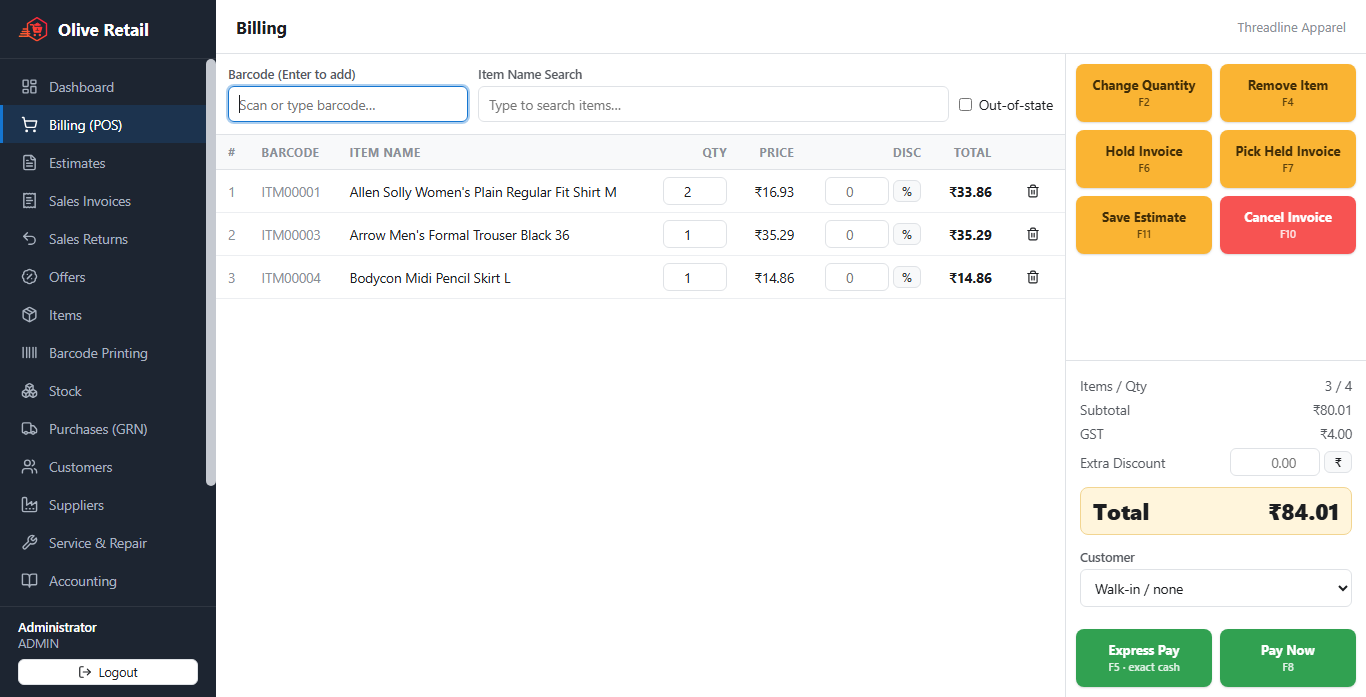
The Olive Retail billing screen with a cart of clothing and a running GST total

Twenty items from one, in one go

Type the sizes and the colours; get every combination as a real item with its own barcode, its own price and its own stock. Add a colour mid-season and only the new ones appear — nothing already on the rack is disturbed.

Size × colour variants

Generate the whole matrix, then see stock as a grid: which sizes of the blue one have gone.

Barcode label printing

Roll or A4 sheets, printed straight from the item list. No separate label software.

Estimates that become bills

Save a cart, hand over a quote, convert it when they come back.

Everything clothing shops need

Billing, stock, customers, purchases, accounting and reports — and the parts of it that only your trade cares about.

Size × colour variants

Generate the whole matrix, then see stock as a grid: which sizes of the blue one have gone.

Barcode label printing

Roll or A4 sheets, printed straight from the item list. No separate label software.

Estimates that become bills

Save a cart, hand over a quote, convert it when they come back.

Alterations as a service line

Charge for the tailoring without pretending it came off a shelf.

Offers and bulk discounts

Season-end rules that apply themselves at the till.

Customer credit and dues

Regulars who pay at month end, with a running balance you can actually read.

Download Olive Retail

Free for 3 months — the full program, nothing held back and no card needed.

Olive Retail

Windows 10 / 11 (64-bit) · v1.7.2

Download

How the trial and subscription work

  1. Install and use everything free for 3 months — no card, no sign-up.
  2. To subscribe, pay online — from Settings → Subscription in the app, or on this website before you have even installed.
  3. Paid in the app, the key arrives by itself. Paid here, you get an activation code: type it under Settings → Subscription.
  4. The app turns the code into its permanent key and works offline from then on.
  5. If a subscription lapses, the software keeps viewing, printing, exporting and backing up your data — only new entries pause.

Simple pricing

Try everything free for 3 months, then choose how you would like to pay. Every plan has every feature of Olive Retail — they differ only in how long the key lasts.

Free trial

₹0 for 3 months

No card, no key, no sign-up fee

The full program on one computer

  • Every feature of Olive Retail
  • Billing counters included while you try
  • Works fully offline
  • Everything you enter stays when you subscribe
Start free trial

Monthly

₹500 / month + GST

₹590 with 18% GST · + ₹200 / month for each extra billing counter

One computer, pay as you go

  • Every feature of your edition
  • Works fully offline
  • Free updates while subscribed
  • Stop any month — your data stays readable
Buy Monthly

Prices are per shop, in Indian rupees, and 18% GST is added when you pay — ₹590 for a month, ₹4,720 for a year. Each plan covers the main computer; billing counters on other computers are added per counter when you buy. You can pay before installing: you get an activation code and the download link for Olive Retail. Not ready to buy? Start the free trial — everything you enter carries straight over when you add a key.

Questions shops ask

Do I need the internet to use Olive Retail?

No. Billing, stock, customers and reports all run on your own computer, so the till keeps working when the connection drops. The internet is only used for Google Drive backups and to download updates.

What happens after the three-month free trial?

Enter a subscription key and carry on exactly where you were. Without one the software turns read-only — you can still view, print, export and back up everything; only new bills and entries pause. Nothing is ever locked away from you.

How do I buy a key?

Prices are ₹500 a month or ₹4,000 a year, plus 18% GST. Pay online by UPI, card or net banking — from Settings → Subscription in the app, or with the Buy buttons on this page. Bought from the app, the key activates by itself a few seconds after you pay. Bought here, choose your app and pay — no need to install anything first. You are given an activation code and the link to download the app; type the code under Settings → Subscription and the app turns it into your permanent key. Would rather pay another way? Call +91 85770 83455 or write to sales@nextolive.com.

Do my billing counters need their own keys?

No. Counters bill against the main computer over your shop’s own network and never need a key of their own. The main computer’s key covers the number of billing counters you pay for — ₹200 per counter per month or ₹1,000 per counter per year plus GST, chosen when you buy or renew.

I am changing my computer. Do I pay again?

No. Send us the Machine ID of the new computer and we move your subscription to it at no cost. Take a backup first and restore it on the new machine — all your data comes with you.

Can I bring in my existing items?

Yes. Import your whole catalogue from an Excel or CSV sheet — names, barcodes, prices, tax rates and opening stock — instead of typing it again.

Where is my data kept?

In one file on your own computer, never on our servers. Scheduled, compressed backups go to a folder or your own Google Drive, and restoring one is a single click.

Are the invoices GST-ready?

Yes. Bills carry your GSTIN, HSN codes and the tax split, and the reports break sales down by tax rate for filing.
Still have a question? WhatsApp us, call +91 85770 83455 or email sales@nextolive.com, 8:00 am – 6:00 pm. Asking about a key? Include your activation code or the Machine ID from Settings → Subscription.
Olive OLIVERETAIL

Olive Retail is one of six Olive point-of-sale products built by NextOlive — custom software, mobile apps and AI development, from Lucknow.

Chat with support